Your menu, on their phone.
Add food photos, prices, and availability. Customers connect to your hotspot and scan a Menu QR in their browser, including on iPhone.
← All apps · Z You Software Solutions
ONE ANDROID PHONE. YOUR RESTAURANT.
Let customers scan your menu, send orders, and get back to enjoying their meal. Manage everything from your Android phone.
Internet is required to start your free trial. Contact Z You Software Solutions for license activation and renewal.
BUILT FOR YOUR DAILY SERVICE
Add food photos, prices, and availability. Customers connect to your hotspot and scan a Menu QR in their browser, including on iPhone.
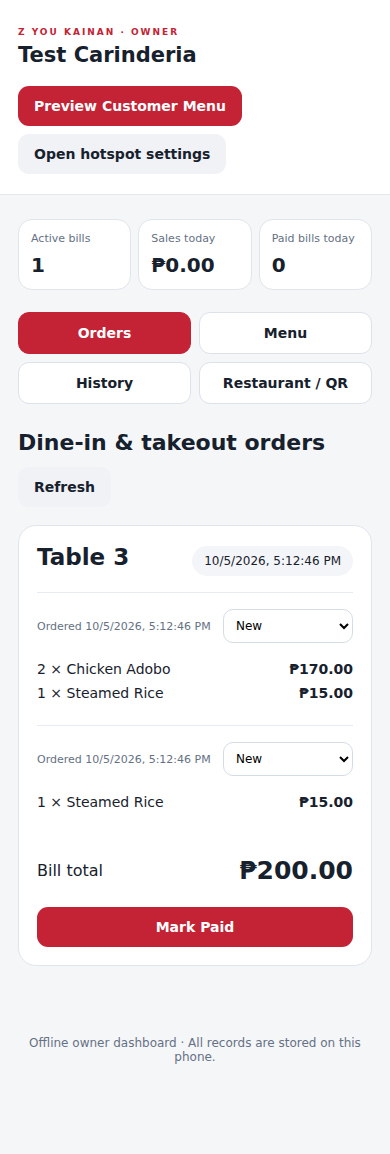
Manage dine-in tables and takeout orders. Update orders from New to Preparing to Served in the owner dashboard.
Enter Cash Received, see automatic Change, and complete payment. Insufficient cash is rejected and payment details are stored in History.
A LOOK INSIDE Z YOU KAINAN
App screens with sample restaurant data. Tap any screenshot to view the full image. Screen appearance may vary by version.
Monitor restaurant bills and order activity.
View full screenshot ↗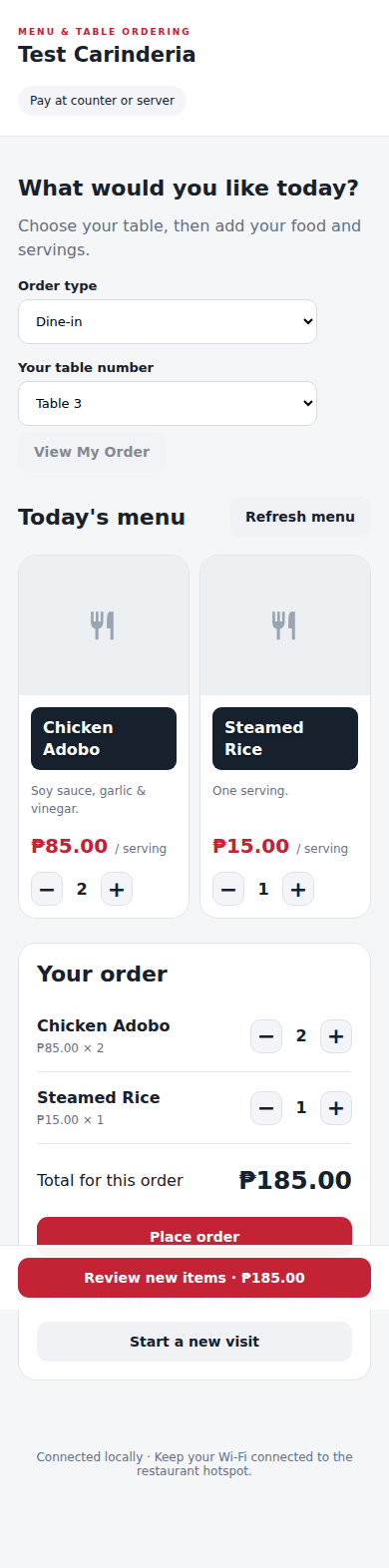
Choose a table, add food and submit an order.
View full screenshot ↗
Customers can place takeout orders from their browser.
View full screenshot ↗
Set up the restaurant and generate Wi-Fi and menu QR cards.
View full screenshot ↗A SIMPLE CUSTOMER EXPERIENCE
Local ordering works without internet after activation. Phones must stay connected to the owner hotspot or the same reachable Wi-Fi network.
TRY IT AT YOUR COUNTER
Start your free trial with just your name and restaurant name. No server address, contact number or license key is needed. Internet is required for activation and renewal; everyday ordering stays local.
One trial per phone. Your countdown and expiry date appear in the app.
The owner can activate a monthly or yearly plan for your device. Monthly subscription: ₱500 / monthContact Z You Software Solutions for a license key and yearly-plan details.
After expiry, only History and renewal controls remain accessible. The app shows an expiry warning; your records stay on the phone. Paid licenses require an online refresh at least every seven days.
Download the app ↓GET STARTED
Download the APK on your Android phone. If prompted, allow your browser to install unknown apps. Follow Android’s security prompts. The owner app is for Android; customers use a browser.
Open License & Subscription. Enter your name and restaurant name, then tap Start 7-day free trial. The app connects to the Z You licensing service automatically.
Save restaurant settings, upload food photos and prices, then switch on your hotspot. Save its exact name and password in the app.
Select the active hotspot address, generate the Wi-Fi and Menu QR cards, and test them from a customer phone. Regenerate the Menu QR if the hotspot address changes.
Menus, food photos, bills and payment history are stored on the owner’s phone. License activation sends your device identifier, owner name and restaurant name to the configured license server. The owner dashboard records license activity and download requests. Backup exports contain restaurant records and hotspot credentials; keep them private. Uninstalling or clearing app data removes local records.